PaaSTA Development
What is the PaaSTA playground?
PaaSTA playground allows the developer to run and debug PaaSTA locally on an ephemeral Kubernetes cluster. Currently, it includes the following components:
- generating
etc_paasta_playgrounddirectory (stores system-level PaaSTA configuration) - generating
soa_config_playgrounddirectory (stores what services PaaSTA should manage) - running setup_kubernetes_job (the tool we use to deploy services on Kubernetes)
- starting the PaaSTA API (the backend that the PaaSTA CLI talks to)
- configuring the PaaSTA CLI (the interface to interacting with PaaSTA)
PaaSTA playground use cases
There are mainly two use cases for PaaSTA playground:
Create a Kind Cluster - K8s Cluster
Before running or debugging PaaSTA playground, you will need to create a Kubernetes cluster using kind. You can do so by running the Make target
make k8s_fake_cluster.
To delete the cluster, run make k8s_clean.
Debugging PaaSTA playground (in VS Code)
All components of PaaSTA playground are easy to debug in VS Code by running the debugging configurations in launch.json file. Before you start
debugging, first run make vscode_settings. This Make target will add debugging settings in launch.json file.
Below outlines the steps to run the debugger in VS Code and to debug PaaSTA playground components.
Running the debugger (in VS Code)
In order to run the debugger with any of the configurations in launch.json, you can go to Run and Debug tab in VS Code
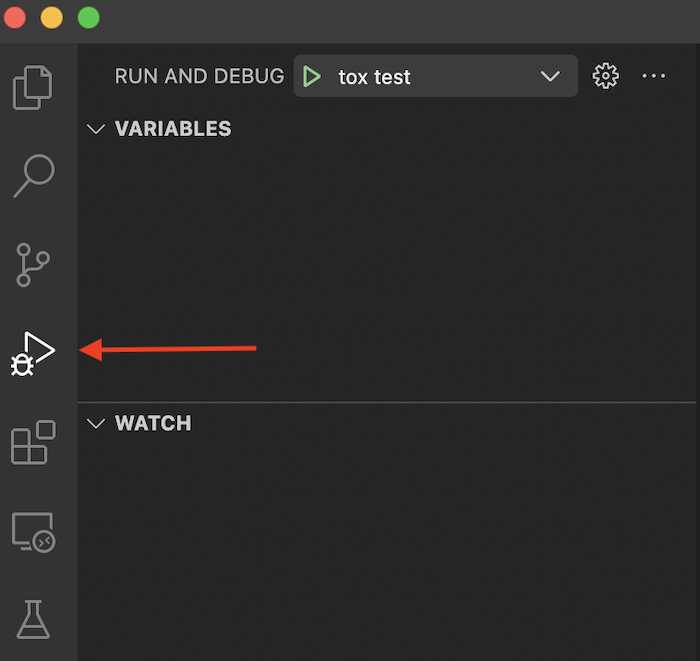
and select the configuration you want to run the debugger with, then press on start debugging button
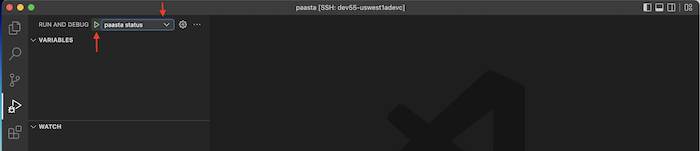
For more information on how to run the VS Code debugger, please refer to VS Code Documentation
Debugging PaaSTA playground components (in VS Code)
Steps below outline running PaaSTA playground components with a debugger attached:
Run
make generate_deployments_for_serviceto run the Make targets that generate theetc_paasta_playgroundandsoa_config_playgrounddirectories and thedeployments.jsonfile.[This step can be ran one time] From the
Run and Debugtab in VS Code, press onRun setup k8s job in playgroundto deploycompute-infra-test-serviceservice in the cluster, if it’s not deployed.(py38-linux) user@dev55-uswest1adevc:~/pg/paasta$ KUBECONFIG=./k8s_itests/kubeconfig kubectl get pods -n paasta NAME READY STATUS RESTARTS AGE compute-infra-test-service-autoscaling-6fdf96b485-2fkd5 1/1 Running 0 25s compute-infra-test-service-autoscaling-6fdf96b485-44lqp 1/1 Running 0 25s compute-infra-test-service-autoscaling-6fdf96b485-9hvc5 1/1 Running 0 25s compute-infra-test-service-autoscaling-6fdf96b485-bdjbw 1/1 Running 0 25s compute-infra-test-service-autoscaling-6fdf96b485-hnxlp 1/1 Running 0 25s compute-infra-test-service-autoscaling-6fdf96b485-jk6z6 1/1 Running 0 25s compute-infra-test-service-autoscaling-6fdf96b485-n9kf4 1/1 Running 0 25s compute-infra-test-service-autoscaling-6fdf96b485-nk2mx 1/1 Running 0 25s compute-infra-test-service-autoscaling-6fdf96b485-pb6mm 1/1 Running 0 25s compute-infra-test-service-autoscaling-6fdf96b485-v8shw 1/1 Running 0 25s
From the
Run and Debugtab in VS Code, press onpaasta API playgroundto run PaaSTA APIWait until workers are booted in API output then from the
Run and Debugtab in VS Code, press onpaasta status playgroundto run the PaaSTA ClI client to connect to the API.
Observe paaSTA API logs to check for connection from the client.
Expected output from client:
compute-infra-test-service.autoscaling in kind-user-k8s-test
    Version:    xxxxxxxx (desired)
    State:      Configured - Desired state: Started
    Kubernetes:   Healthy - up with (10/10) instances (0 evicted). Status: Running
      ReplicaSets:
        ReplicaSet Name                                    Ready / Desired  Created at what localtime         Service git SHA                           Config hash
        compute-infra-test-service-autoscaling-6fdf96b485  10/10            2022-12-14T08:19 (2 minutes ago)  xxxxxxxxxxxxxxxxxxxxxxxxxxxxxxxxxxxxxxxx  configxxxx
Running PaaSTA playground
There are two ways you can run PaaSTA playground:
If you didn’t run setup_kubernetes_job to deploy compute-infra-test-service service you can simply run it using make setup-kubernetes-job.
- Using
launch.jsonfile- From the
Run and Debugtab in VS Code, press onpaasta playground. This will run all PaaSTA components.
- From the
- Using make targets
- Run
make setup_kubernetes_jobto run the Make target that generates theetc_paasta_playgroundandsoa_config_playgrounddirectories anddeployments.jsonfile and deploys workloads to the cluster. - Run
make playground-apito run the Make target that runs PaaSTA API. - Wait until workers are booted in API output then from the
Run and Debugtab in VS Code, press onpaasta status playgroundto run the PaaSTA ClI client to connect to the API.
- Run